// games and discord bots

hunnaG: games and Discord bots

Games that run in your browser, and Discord bots you can add to a server in two clicks. Every bot says exactly what it needs and why. Open any entry for the full story.

01

Games

They run in your browser. All of them are free.

Released

Ready to play. Most still get updates.

Blob Siege

A shooter in your browser where everything is made of blocks you can build with or blow apart. Defend a fort against another team, hold off endless zombie waves and their giant bosses together, or race up a ladder of guns. Send a friend a link to join, or fill the empty seats with bots. Free, on a PC, with nothing to install and no account needed.

PCup to 12 online · bots fill seatsupdated

Blob Siege is a first-person shooter where the whole world is made of blocks. Walls, towers and whole forts go up in seconds, and anything built can be shot or blown apart, so no two games play out the same. It runs in a browser tab on a PC: open the page, send a friend the link, and you are playing together. There is nothing to install and no account to make.

Three ways to play

Capture the Zone. Two teams, five a side to start with. Defenders build a fort around a flag; attackers choose where to strike from and try to take it.

Zombie Survival. Everyone together against waves of zombies that never stop growing. Build walls, buy guns from the Mystery Box and upgrade them, and stock up from a supply helicopter between waves. The zombies climb, dig and tear your walls apart, and giant bosses join in as the waves go on: a Zombie Bear, a Zombie T-Rex and an undead dragon.

Gun game. Everyone for themselves. Every kill hands you the next gun on a ladder, and the first to get a kill with the knife at the top wins.

Friends, bots and leaderboards

  • Host a game and share its link or its five-letter code. Up to twelve players fit in one game.
  • Nobody around? Bots fill the empty seats, from Very easy to Very hard, and play every mode the way a person would. A friend who joins later takes a bot’s seat.
  • Paint your own blob, pick a map (a castle, a beach, a military base, the backrooms and more), and change the game rules to suit you.
  • Leaderboards for every mode, with player profiles and badges. You start as a guest; save an account with a name and password, Discord or Google, and your blob and settings follow you to any browser.

Under the hood

Built with TypeScript and three.js. Games are peer-to-peer: the host’s browser runs the match and the other players connect straight to it (WebRTC, through PeerJS), so there is no game server in the middle. Some school, work and mobile networks block direct connections, and a relay server carries the game for players on those.

Smugglers N Sheriffs

A bluffing party game you play on your phones. Each round one player is the Sheriff and everyone else smuggles: they secretly pack crates of goods and contraband and try to get them through with a straight face or a bribe, while the Sheriff decides whose crate to search. Nothing to install, and bots can fill the empty seats.

phone · PC3–8 online · bots fill seatsupdated

Smugglers N Sheriffs is a party game about lying to your friends’ faces. It is quick to learn and at its best with a group that likes to bluff, bargain and accuse each other. Everyone plays on the phone already in their pocket: one person makes a room, and the others join with its four-letter code or an invite link.

How a round goes

Pack. Everyone shops from the same market: three legal goods and three kinds of contraband. Contraband pays more, but bigger pieces cover more of your three-by-three crate, so they are easier to find. Pack in secret, and put a bribe on the table if you like.

Inspect. The Sheriff has a few action points to search crates and shake smugglers down, and every result is announced to the whole table. Bribes can be offered, changed or pulled at any moment, and a smuggler can tip the Sheriff off about a rival.

Sell. Every crate opens, and whatever got past the Sheriff sells. The Sheriff’s star moves on until everyone has worn it, and the richest player wins.

Good to know

  • Made for phones; a computer’s browser works too.
  • Short on players? The host can fill empty seats with bots, each a character with its own greed.
  • No app and no account: open the page and play.

Under the hood

Built with TypeScript and React. Each room runs on Cloudflare as a Durable Object, one small server per game, which keeps every phone in the room in step.

  • Made for phones: everyone joins the same room on their own phone. A PC browser works too.
  • Make a room and share its four-letter code or the invite link. Bots can fill the empty seats.

Monopalade

A business game about running a lemonade stand for a month. Buy lemons, set your price and open up; weather, picky customers and surprises on the street decide how the day goes. At night you restock, advertise, and decide whether to borrow from a bank that watches your credit score. Made for a phone, and fine on a computer too.

phone · PCsoloupdated

Monopalade is a relaxed business game about running a lemonade stand for a month. The days are short, so it fits a spare moment on a phone. It began in 2019 as a hackathon game about money skills, and it still teaches a few without lecturing: buying in bulk against letting stock go to waste, pricing for the crowd, and what borrowing does to a credit score.

You start with $25, a credit score of 650 and no lemons. Finish day thirty with a top-level stand and $2,400 for the Lemonade Empire ending; smaller fortunes get lesser endings, and running out of money with bad credit means bankruptcy. After day thirty you can keep going.

How a day goes

At night, plan. Buy lemons in three qualities. Bulk packs are cheaper per cup, but lemons go stale after a couple of nights. Set your price, upgrade the stand, and pick advertising, from flyers to a TV feature.

By day, sell. Open the stand and watch the street. Every passer-by has a budget and a taste for quality: they buy when the price is right, and happy customers spread the word. The weather decides how many people come out, and the forecast is usually right.

Surprises. From the second week the street has its own ideas: a festival that doubles the crowd, road works that thin it, a school trip, a rival stand undercutting you, and a health inspector who fines stale lemons.

The credit score

The bank lends according to your score: nothing under 580, small and expensive loans in the 600s, bigger and cheaper ones above 700. Repayments come out every night. Paying on time raises the score, missing a payment lowers it, and running out of cash forces an emergency loan at a painful rate. Borrow early to grow fast, or play it safe.

Also in it

  • A daily challenge: the same season for everyone, with a board of the best results.
  • A season review with charts of your money, customers and lemons, and medals for what the run did well.
  • Speed the day up to 4x, or skip straight to the results.

Under the hood

The 2019 original was built in Unity by a team of three, and its customers were hand-drawn by a friend at the event. The web version keeps that design and rebuilds the rest in TypeScript. The economy is a deterministic, tested simulation: the same starting seed always plays out the same way, which is how the daily board checks every run by replaying it. The street is drawn live on a canvas and changes with the weather and the time of day.

Unlucky Traveler

A survival adventure drawn entirely in letters and symbols. You've been bitten, and you have sixteen days to find the one healer who can cure you: buy rumours in towns, climb towers to spot her smoke, and fight, dodge or run from whatever lives out there. Every run is a new world. Plays in the browser with keys or taps.

phone · PCsoloupdated

Unlucky Traveler is a short, tense adventure in the style of old computer games, where the whole world is drawn with text characters. Something bit you on the way in. A healer far out can cure it, nobody is sure where, and you have sixteen days of walking before the poison wins. Each run builds a new world, and when you die you start again: the kind of game people call a roguelike.

What you do

Explore. The map is a hundred squares by a hundred, with two roads crossing at the centre, where every run begins. The roads are safe; the wild is not. The farther you go, the worse what lives there and the better what is left lying about. Every ? is a place: a town, a bandit camp, a cave or a landmark.

Hunt for the healer. Buy rumours in towns, listen to what people say, and climb a water tower, radio mast or lighthouse to look for her smoke. Cure the bite and the clock stops; then keep walking for a higher score.

Stop in towns. Trade, upgrade your weapon, search the place, chat, or pay for a bed. Or attack the town and fight its protector, and it will hate you for good.

Fight. Attack, dodge or flee. Heal from your bag, and turn experience into levels. The creatures come from the original game: the Rabid Squirrel, the Uncanny Bear, the Cannibalistic Clown and more.

Two versions

Pick one from the menu. Version 1 is the game as it was written. Version 2, the Burn, is harder: the land dries out into ground where nothing grows, every step out there costs health unless you carry water, and the healer waits behind a walled gate.

Where it came from

It began in July 2020 as a C++ game played by typing commands: one file, never finished. This version brings it to the browser in TypeScript, keeps its world and its writing, and finishes what it left. The game’s rules are kept apart from the screen and tested, and every world comes from a seed, so a run can be replayed exactly.

Elements

hunnaG did not design Elements. Zanzarino Design made it, as a Flash card game first released in 2009, and it went offline along with Flash. This unofficial recreation brings it back as close to the original as it can: build a deck from twelve elements, duel computer opponents up to the False Gods, or duel another player online.

PCsolo · 1v1 onlineupdated

Not hunnaG’s design. Elements was created by Zanzarino Design. It was a Flash collectible card game, first released in 2009 and built up over the years after, and it went offline along with Flash. Every rule, card and screen in it is theirs. This is an unofficial fan recreation, made so the game can be played again, and it is not connected to the original’s makers.

What kind of game it is. Two players with 100 health each take turns playing cards. Every card belongs to one of twelve elements, such as fire, water, life and death, and is paid for with quanta, the energy your pillars make each turn. Creatures attack, spells strike or protect, and weapons and shields change the fight. Choosing which elements go in your deck is the heart of the game.

What is in it. Build a deck and duel the computer, from the Trainer up to the False Gods at the end of the quests. Win electrum, the game’s money, to buy and upgrade cards, or duel another player online. Progress is kept with an account on the game’s own server.

Faithful on purpose. When the original and convenience disagree, the original wins. The rules follow the original card set, the computer opponents play the decks they played, and the screens are rebuilt from screenshots of the Flash game. The card art is redrawn after the original’s.

Under the hood. Plain JavaScript in the browser. Accounts, saves and online duels run on Cloudflare: Workers, a D1 database and Durable Objects.

Credits. Elements and its design belong to Zanzarino Design. The card data comes from the openEtG project, under its MIT license.

  • A desktop browser, with a mouse.
  • Progress is kept with an account on the game's own server: a name and a password, and an e-mail only if you want one.

In development

Playable while they are being made. Expect changes.

Plunderbound

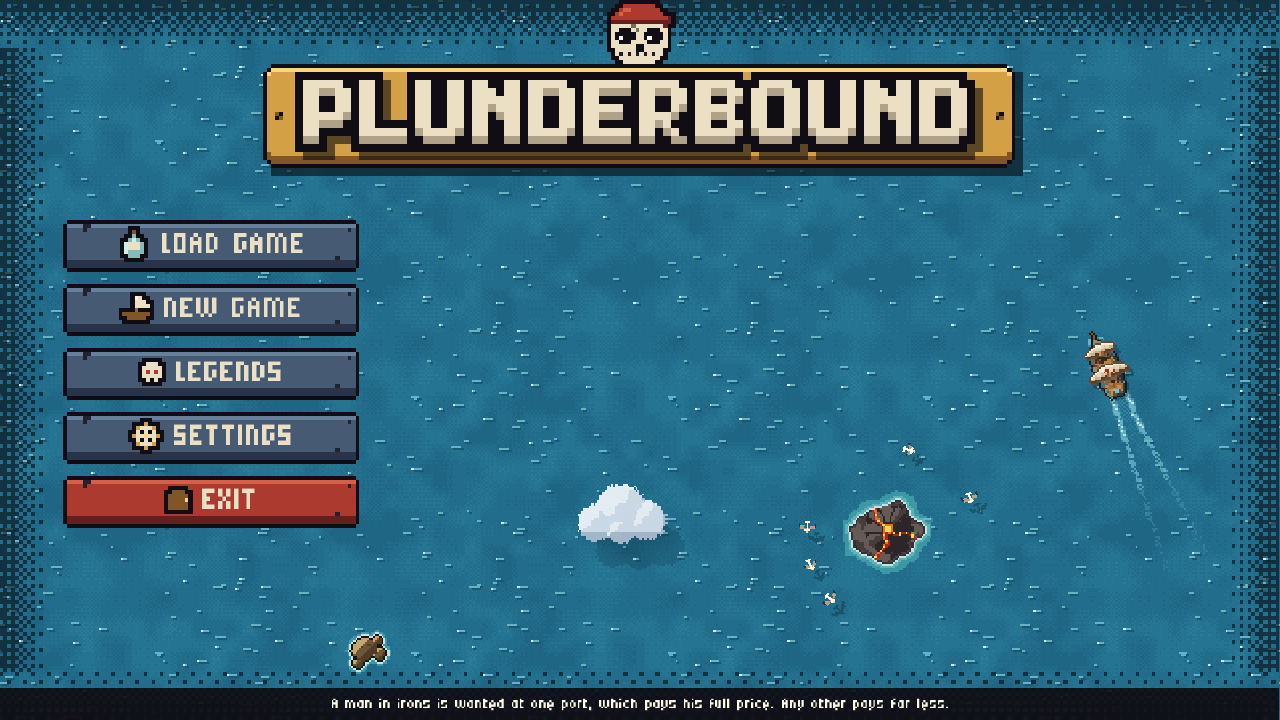
A pixel-art pirate adventure, still being made. Take a ship and a crew onto a dangerous sea: fight ship to ship, board and fight on deck, explore islands and ports, and keep your crew fed, healthy and loyal, or face a mutiny. Your name, cruel or merciful, decides whether the next ship surrenders or runs. An early version plays in a desktop browser; a download is coming soon.

PCsoloupdated

Plunderbound is a pirate game seen from above, in pixel art. You captain a crew, not a lone hero, across a sea that gets more dangerous the farther you sail, and the story is the name you make out there. It is still being made: an early version plays in a desktop browser now, and a downloadable release is coming soon.

Your name. Two things follow you around: how widely you are known, and what you are known for, from cruel to merciful. Word only spreads when somebody lives to tell it, so sinking a ship with every hand aboard earns you almost no name at all. A feared name makes ships surrender at a hail; a name for keeping your word makes them surrender knowing they will live. A cruel one brings out the bounty hunters.

At sea. Sailing and ship fights happen in real time: round, chain and grape shot, wind that comes and goes, and an iron ram. Board an enemy and the fight moves to the deck, turn by turn.

Your crew. Fifty-one unique crewmates to find, each with a story and words of their own. They make friends and grudges, learn new moves as they level up, and need food, care for their wounds and good morale. Run the ship badly and they grumble, then mutiny.

Ashore and beyond. Explore islands and wrecks, trade each region’s goods in port, fit out your ship at the shipwright, storm forts, and hunt the Crown’s treasure ship. Old stories lead across six regions, from the Known Waters to the Maw.

Starts and ends. Choose how your company starts. No Quarter gives you one life and no second chances. The Legends remember what every finished voyage left behind.

Under the hood. Made in Ruby with DragonRuby, a small game engine. The browser version saves in that browser, on that device. Bugs can be reported from inside the game, and players can choose to share anonymous numbers about their voyages to help with balance.

Screens

Plunderbound screenshot
  • A desktop browser, with a mouse and keyboard.
  • The first visit downloads about 36 MB. Then click to begin; the sound starts then.
  • Saves are kept in that browser, on that device.
  • A downloadable release is coming soon. The browser version is an early look at a bigger game.
02

Discord bots

Add one to your server with two clicks. Each entry says exactly what it needs and why.

For running a server

Tickets, roles, events, giveaways, and lookups.

TicketBot

A help desk for your server. Members press a button, pick what they need help with, and get a private channel that only they and your staff can see. Staff claim the ticket, answer it and close it, and a full written copy of the conversation is saved to a log channel. Good for support, reports, appeals, or anything that shouldn't be talked about in public.

  • Python
  • Pycord

TicketBot gives your server a help desk. Instead of messaging moderators one by one or asking in a public channel, members press one button and get a private conversation with your team. They never need to type a command.

  • One panel with a button and up to 25 categories, such as Billing or Report a User.
  • Each ticket is a private channel, or a private thread if you would rather keep the channel list short.
  • Staff claim a ticket so everyone knows who is on it, add other people to it, and close it as resolved or unresolved, with a reason.
  • When a ticket closes, a transcript (a full copy of the conversation) goes to a log channel, and to the member too if you turn that on.
  • Choose which roles get pinged for new tickets, and block people who abuse it.
  • Every setting is per server, so it works the same in any community.
First five minutes
  1. Add it. It needs to manage channels and roles so it can create ticket channels and the blacklist role.
  2. As an administrator, run /ticketbot setup admin_role:@Support ticket_channel:#get-help: the Tickets category, the log channel and the panel appear. Add mode:threads to run tickets as private threads, and dm_transcripts:True to send each opener a copy of their transcript.
  3. Optionally, add more admin roles with /ticketbot admins add, choose who gets pinged with /ticketbot setnotifyroles, and shape the categories with /ticketbot addcategory. The defaults are Suggestion, Complaint, Report a User, and General Question.
  4. Open a test ticket from the panel, press Claim, then Close with a reason, and check the transcript in ticket-logs.
Good to know

Tickets live under a category named “Tickets”, and the log channel is called ticket-logs. The panel survives restarts, and /ticketbot help lists everything.

Every ticket gets a number (ticket-0042-alex) and a first message with two buttons for staff: Claim and Close. Closing asks for a reason, which goes to the log and, if the server has turned that on, to the person who opened the ticket together with their transcript. In thread mode a closed ticket is locked and archived rather than deleted.

Need help? Ask in the hunnaG Discord.

Commands

Anyone can use the first group. The second is for the people who run the server.

For everyone

  • /ticket create

    Get a link to the ticket panel.

    you/ticket createTicketBotClick the button below to open a ticket. [ Go to Create Ticket ]Only you can see this · Dismiss message
  • /ticketbot admins list

    Who handles tickets here.

    you/ticketbot admins listTicketBotTicketBot admin roles The server owner, administrators, and @Support, @Mods How it works: Admins run the admin commands. The owner and administrators always can, and they change this list with /ticketbot admins add and /ticketbot admins remove. Made by @hunnaGOnly you can see this · Dismiss message
  • /ticketbot info

    The build, the links, a check of the permissions it has in this server and channel, and this server's setup. Same on every hunnaG bot.

    you/ticketbot infoTicketBotTicketBot Private support tickets for your server, with a button panel, admin roles, and transcripts. Hub page · Terms · Privacy · Invite · Invite with every feature Build: 3f2a1c9 · 2026-10-08 · up 2d 4h · in 2 servers Permissions here: ✅ View Channels · ✅ Send Messages · ✅ Embed Links · ✅ Read Message History · ✅ Attach Files · ✅ Manage Channels · ✅ Manage Roles · ❌ Mention Everyone (optional): missing. Pings notify roles that are not mentionable. · Privileged intents: Message Content This server: Admins: the server owner, administrators, and @Support · Set up: panel in #get-help · tickets as private channels · log #ticket-logs · 5 categories · transcripts to openers on · Pinged on a new ticket: @Support · Tickets opened here so far: 42 Made by @hunnaGOnly you can see this · Dismiss message
  • /ticketbot help

    Every command, grouped by who can use it.

    you/ticketbot helpTicketBotTicketBot help For everyone · For admins · Setup, owner and administrators: one line per command Opening a ticket: members press the button on the panel and pick a category; no command needed. Staff get Claim and Close buttons under every ticket's first message. Made by @hunnaGOnly you can see this · Dismiss message

For admins

  • /ticket closeadmin

    Close the current ticket as resolved or unresolved, with a reason for the log. The transcript goes to the log channel, and to the person who opened the ticket if the server turned that on; then the channel is removed, or the thread locked. The Close button under the ticket's first message does the same.

    you/ticket close reason:Refund issuedTicketBotClosing ticket #42. [ Resolved ] [ Unresolved ] [ Cancel ] (without a reason on the command, a form asks for one)Only you can see this · Dismiss message
  • /ticket adduseradmin

    Give one or more people access to the current ticket.

    you/ticket adduser users:@alex @samTicketBotAdded to ticket: @alex @sam
  • /ticket removeuseradmin

    Take people out of the current ticket.

    you/ticket removeuser users:@alexTicketBotRemoved from ticket: @alex
  • /ticket blacklistadmin

    Stop one or more users from opening tickets.

    you/ticket blacklist users:@spammerTicketBotBlacklisted: @spammer
  • /ticket unblacklistadmin

    Let blacklisted users open tickets again.

    you/ticket unblacklist users:@spammerTicketBotUnblacklisted: @spammer
  • /ticketbot setupadmin

    Create the Tickets category, the log channel, the blacklist role, and post the panel in a channel of your choice. Safe to run again; it refreshes the panel. Options: tickets as private channels or as private threads under the panel channel, and a transcript copy for the person who opened each ticket.

    you/ticketbot setup admin_role:@Support ticket_channel:#get-help dm_transcripts:TrueTicketBotTicket system setup complete! Tickets open as private channels in the Tickets category. People get a copy of their transcript when a ticket closes.Only you can see this · Dismiss message
  • /ticketbot addcategoryadmin

    Add a ticket category with an optional emoji. Up to 25.

    you/ticketbot addcategory name:Billing emoji:💳TicketBotAdded ticket category: 💳 BillingOnly you can see this · Dismiss message
  • /ticketbot removecategoryadmin

    Remove a category. The last one cannot be removed.

    you/ticketbot removecategory name:ComplaintTicketBotRemoved ticket category: ComplaintOnly you can see this · Dismiss message
  • /ticketbot listcategoriesadmin

    Show the server's categories.

    you/ticketbot listcategoriesTicketBotTicket Categories: 💡 Suggestion 😠 Complaint 👤 Report a User ❓ General Question 💳 BillingOnly you can see this · Dismiss message
  • /ticketbot admins addadmin

    Let a role handle tickets; it also gets to read the log channel. The owner and administrators always can, and only they can change this. Same on every hunnaG bot.

    you/ticketbot admins add role:@ModsTicketBot✅ @Mods can now run TicketBot's admin commands here.Only you can see this · Dismiss message
  • /ticketbot admins removeadmin

    Revoke that. The last ticket admin role cannot be removed.

    you/ticketbot admins remove role:@ModsTicketBot✅ @Mods no longer runs TicketBot's admin commands here.Only you can see this · Dismiss message
  • /ticketbot setnotifyrolesadmin

    Choose which admin roles get pinged when a ticket opens. Owner or Administrators.

    you/ticketbot setnotifyroles roles:@SupportTicketBotNotification roles set to: @SupportOnly you can see this · Dismiss message
  • /ticketbot listnotifyrolesadmin

    Show which roles get pinged.

    you/ticketbot listnotifyrolesTicketBotNotification Roles: @SupportOnly you can see this · Dismiss message
What it needs

Requiredwithout these the bot cannot do its job

  • View ChannelsSees the panel channel and the ticket channels it creates.
  • Send MessagesPosts the panel, ticket welcomes, and closing notes.
  • Embed LinksThe panel and ticket messages are embeds.
  • Read Message HistoryReads the ticket back for the transcript and finds the panel after a restart.
  • Attach FilesPosts the transcript as a file in the log channel.
  • Manage ChannelsCreates the Tickets category, the log channel, and one channel per ticket, and deletes closed tickets.
  • Manage RolesCreates the blacklist role and sets who can see each ticket.

Optionaleach one switches on an extra part

  • Mention EveryonePings notify roles that are not mentionable. Without it, mentionable roles still get pinged.
  • Create Private ThreadsThread mode only. Opens each ticket as a private thread under the panel channel.
  • Send Messages in ThreadsThread mode only. Posts the welcome and the closing note in the thread.
  • Manage ThreadsThread mode only. Adds people to a ticket and locks it when it closes.

Reads: Message Content intent, builds the transcript from the ticket's messages when it closes. These are Discord's privileged intents, already switched on for this bot.

RoleReactionBot

Lets members pick their own roles. Post a list of roles with an emoji beside each; members react to get a role and react again to drop it, and the bot clears their reaction right away so the post stays clean. You build and edit the post through a form and a role picker, with no codes to type. It can also give every new member a role of your choice as they join.

  • Python
  • Pycord

Roles are how a Discord server sorts its members: they can give a name a colour, open up channels, or decide who gets pinged. RoleReactionBot lets members choose their own, such as the games they play, their region, or which announcements they want, by reacting to a post.

  • React with an emoji to get a role, and react again to drop it.
  • The bot removes each reaction straight away, so the post never fills up and the list stays easy to read.
  • Build the post through a form and a role picker, and change it any time.
  • Optionally, give everyone who joins a starting role, such as Member. Turn on that role’s “Display role members separately” setting and your members show under it in the member list, apart from the bots.
First five minutes
  1. Add it. It needs Manage Roles, and in your server settings its own role must sit above every role it hands out.
  2. Optionally, as an administrator, let a role manage posts with /rolereactionbot admins add role:@Mods. The owner and administrators already can.
  3. Run /rolereaction createpost channel:#roles and fill in the form: title, description, color.
  4. Add each emoji and role pair with the 'Add a role' button under the confirmation, or /rolereaction addrole.
  5. Members react to get the role and react again to drop it; the bot clears their reaction each time.
  6. Optionally, give every new member a role with /rolereaction autorole set role:@Member. Add current_members:True to give it to everyone already here too.
Good to know

It uses one of Discord’s privileged intents, the extra access to message text, member lists and online status that a bot has to ask Discord for: Members, for the auto-role alone. That is how it hears that someone joined, and it stores nothing about them. A role with moderation permissions can’t be the auto-role, since everyone who joins would get it. Posts can be changed later with /rolereaction editpost and /rolereaction addrole. A post’s ID comes from “Copy Message ID” in Discord’s message menu, with Developer Mode on.

Need help? Ask in the hunnaG Discord.

Commands

Anyone can use the first group. The second is for the people who run the server.

For everyone

  • /rolereactionbot admins list

    Who may manage reaction posts here.

    you/rolereactionbot admins listRoleReactionBotRoleReactionBot admin roles The server owner, administrators, and @Mods How it works: Admins run the admin commands. The owner and administrators always can, and they change this list with /rolereactionbot admins add and /rolereactionbot admins remove. Made by @hunnaGOnly you can see this · Dismiss message
  • /rolereactionbot info

    The build, the links, a check of the permissions it has here (including whether its role sits above the roles on its posts), and this server's setup. Same on every hunnaG bot.

    you/rolereactionbot infoRoleReactionBotRoleReactionBot React to an emoji, get a role. Build the post with a form and edit it any time. Hub page · Terms · Privacy · Invite · Invite with every feature Build: 3f2a1c9 · 2026-10-08 · up 2d 4h · in 3 servers Permissions here: ✅ View Channels · ✅ Send Messages · ✅ Embed Links · ✅ Add Reactions · ✅ Read Message History · ✅ Manage Roles · ✅ Manage Messages (optional) · ✅ The bot's role sits above every role on its posts here. · Privileged intents: Server Members This server: Admins: the server owner, administrators, and @Mods · Reaction posts here: 2, with 7 emoji and role pairs · Auto-role for new members: @Member Made by @hunnaGOnly you can see this · Dismiss message
  • /rolereactionbot help

    Every command, grouped by who can use it.

    you/rolereactionbot helpRoleReactionBotRoleReactionBot help For admins · Setup, owner and administrators · For everyone: one line per command For members: react to a post to get the role, react again to drop it. The bot clears your reaction each time. Made by @hunnaGOnly you can see this · Dismiss message

For admins

  • /rolereaction autorole setadmin

    Give a role to every member who joins. In a server with rules screening they get it once they accept the rules, so it never lets anyone skip them. Bots never get it. Set current_members to give it to everyone already here too.

    you/rolereaction autorole set role:@Member current_members:TrueRoleReactionBot✅ Everyone who joins now gets @Member; anyone still in rules screening gets it once they accept the rules. Bots never do. Turn it off with /rolereaction autorole off. Giving @Member to the members already here; I'll say when it's done. Done: 41 member(s) got @Member.Only you can see this · Dismiss message
  • /rolereaction autorole offadmin

    Stop giving the role to new members. Members who have it keep it.

    you/rolereaction autorole offRoleReactionBot✅ New members no longer get a role from me. Members who have it keep it.Only you can see this · Dismiss message
  • /rolereaction createpostadmin

    Pick a channel and fill in a form with the title, description, and color. Then add emoji and role pairs with the "Add a role" button or /rolereaction addrole.

    you/rolereaction createpost channel:#rolesRoleReactionBot(a form: Title, Description, Color) Post created in #roles. Its message ID is 1398035064557801522. Add emoji/role pairs with /rolereaction addrole 1398035064557801522 <emoji> <role>, or use the button below. [ ➕ Add a role ]Only you can see this · Dismiss message
  • /rolereaction addroleadmin

    Add an emoji and role pair to an existing post.

    you/rolereaction addrole message_id:1398035064557801522 emoji:🎮 role:@GamerRoleReactionBotAdded 🎮 for role @Gamer to the post.Only you can see this · Dismiss message
  • /rolereaction removeroleadmin

    Remove a role from a post, along with its reaction.

    you/rolereaction removerole message_id:1398035064557801522 role:@GamerRoleReactionBotRemoved role @Gamer from the post.Only you can see this · Dismiss message
  • /rolereaction editpostadmin

    Open a form, pre-filled with the current values, to change a post's title, description, or color.

    you/rolereaction editpost message_id:1398035064557801522RoleReactionBot(the same form, filled in with the post's current title, description and color) Post updated successfully.Only you can see this · Dismiss message
  • /rolereaction deletepostadmin

    Delete a post and everything stored about it.

    you/rolereaction deletepost message_id:1398035064557801522RoleReactionBotSuccessfully deleted the post and its data.Only you can see this · Dismiss message
  • /rolereactionbot admins addadmin

    Let a role manage reaction posts. The owner and administrators always can, and only they can change this. Same on every hunnaG bot.

    you/rolereactionbot admins add role:@ModsRoleReactionBot✅ @Mods can now run RoleReactionBot's admin commands here.Only you can see this · Dismiss message
  • /rolereactionbot admins removeadmin

    Revoke that.

    you/rolereactionbot admins remove role:@ModsRoleReactionBot✅ @Mods no longer runs RoleReactionBot's admin commands here.Only you can see this · Dismiss message
What it needs

Requiredwithout these the bot cannot do its job

  • View ChannelsSees the channel the post lives in.
  • Send MessagesPosts and confirms.
  • Embed LinksThe role post is an embed.
  • Add ReactionsPuts each emoji on the post so members have something to tap.
  • Read Message HistoryFinds and updates the post by its ID.
  • Manage RolesHands out and removes the roles. Its own role must sit above every role it manages.

Optionaleach one switches on an extra part

  • Manage MessagesRemoves each member's reaction after toggling their role, so the post stays tidy. Without it the reactions pile up, but roles still work.

Reads: Server Members intent, the auto-role. It is how the bot hears that someone joined or accepted the rules, and how it finds the members already there when you ask. Nothing about members is stored. These are Discord's privileged intents, already switched on for this bot.

EventBot

Sign-ups for tournaments, game nights, scrims and meetups. Members sign up alone or as a team with one button and answer any questions you ask, and sign-ups close by themselves at the deadline. Then pick the players yourself, or let the bot draw them at random.

  • Python
  • Pycord

EventBot replaces the “react if you’re in” message and the list somebody keeps by hand after it. Post an event with a time and a deadline; members press Sign Up, and the post keeps an up-to-date list of who is in.

  • Sign-ups for individuals or whole teams, with a smallest and largest team size.
  • Ask every sign-up a yes-or-no question and a free-text one.
  • Sign-ups close on their own at the deadline, or whenever you close them.
  • Pick the participants by hand, or draw a number of them at random.
  • Edit, close or delete any event from one list.
  • Times are typed as plain dates and read in your server’s time zone.
First five minutes
  1. Add it. It only needs to send messages and read its own posts.
  2. Set the server's timezone once with /eventbot timezone zone:America/Chicago, so plain dates are read correctly.
  3. Optionally, as an administrator, let a role run the event commands with /eventbot admins add role:@Organizers. The owner and administrators already can.
  4. Run /event create, type the time like 2026-10-12 19:00 or 10/12/2026 7:00pm, and the sign-up post appears with its button. Discord timestamp codes such as <t:1700000000:F> work too.
Good to know

Deadlines are checked every 30 seconds. Members never need a command: the Sign Up and Un-sign buttons are the whole of it for them. It needs none of Discord’s privileged intents, the extra access to message text, member lists and online status that a bot has to ask Discord for.

Need help? Ask in the hunnaG Discord.

Commands

Anyone can use the first group. The second is for the people who run the server.

For everyone

  • /eventbot admins list

    Who may run the event commands here.

    you/eventbot admins listEventBotEventBot admin roles The server owner, administrators, and @Organizers How it works: Admins run the admin commands. The owner and administrators always can, and they change this list with /eventbot admins add and /eventbot admins remove. Made by @hunnaGOnly you can see this · Dismiss message
  • /eventbot info

    The build, the links, a check of the permissions it has in this server and channel, and this server's setup. Same on every hunnaG bot.

    you/eventbot infoEventBotEventBot Sign-up posts for events, solo or in teams, with deadlines, questions, and random picks. Hub page · Terms · Privacy · Invite Build: 3f2a1c9 · 2026-10-08 · up 2d 4h · in 2 servers Permissions here: ✅ View Channels · ✅ Send Messages · ✅ Embed Links · ✅ Read Message History This server: Admins: the server owner, administrators, and @Organizers · Timezone for plain dates: America/Chicago · Active events here: 1 Made by @hunnaGOnly you can see this · Dismiss message
  • /eventbot help

    Every command, grouped by who can use it.

    you/eventbot helpEventBotEventBot help For admins · Setup, owner and administrators · For everyone: one line per command Signing up: press the Sign Up and Un-sign buttons on an event post. No command needed. Made by @hunnaGOnly you can see this · Dismiss message

For admins

  • /event createadmin

    Post a sign-up for an event. Choose individuals or teams, the channel, the event time, the sign-up deadline, and optional team sizes, questions, and a log channel. Times are plain dates in the server's timezone.

    you/event create title:Scrim Night signup_type:Teams channel:#events event_time:2026-10-12 19:00 signup_deadline:2026-10-11 23:59 max_team_size:5EventBotEvent created successfully in #events!Only you can see this · Dismiss message
  • /event listadmin

    Show this server's active events with edit, close, and delete buttons.

    you/event listEventBotActive Events 🟢 Open - Scrim Night - ID: 1398035064557801522 (pick one from the menu) [ Edit ] [ Close Sign-ups ] [ Delete ]Only you can see this · Dismiss message
  • /event editadmin

    Change an event's title, description, time, or deadline.

    you/event edit message_id:1398035064557801522EventBotWhat would you like to edit? (a menu: Title, Description, Event Time, Signup Deadline, then a one-field form) ✅ Event title updated!Only you can see this · Dismiss message
  • /event closeadmin

    Close sign-ups now instead of at the deadline.

    you/event close message_id:1398035064557801522EventBot✅ Event sign-ups have been forcibly closed.Only you can see this · Dismiss message
  • /event pickadmin

    Hand-pick participants from the sign-ups.

    you/event pick message_id:1398035064557801522EventBotPlease select the participants for the event. (a menu of everyone signed up) [ Confirm Picks ] ✅ Participants have been chosen and the event post has been updated!Only you can see this · Dismiss message
  • /event pickrandomadmin

    Draw a number of participants at random.

    you/event pickrandom message_id:1398035064557801522 number_to_pick:8EventBot✅ Participants have been randomly selected and the event post has been updated!Only you can see this · Dismiss message
  • /event removesignupadmin

    Remove a person or team from an event by its position in the list.

    you/event removesignup message_id:1398035064557801522 number:3EventBotAre you sure you want to remove user alex from the event? [ Confirm Removal ] [ Cancel ] ✅ Successfully removed user alex.Only you can see this · Dismiss message
  • /event deleteadmin

    Delete an event post and its sign-ups.

    you/event delete message_id:1398035064557801522EventBot✅ Event 1398035064557801522 has been successfully deleted.Only you can see this · Dismiss message
  • /eventbot timezoneadmin

    Set the server's timezone so plain dates are read correctly. Autocompletes common zones. Needs Manage Server.

    you/eventbot timezone zone:America/ChicagoEventBot✅ Plain event dates in this server are now read in America/Chicago, where it is currently 2026-10-12 14:05 (02:05 PM).Only you can see this · Dismiss message
  • /eventbot admins addadmin

    Let a role run the event commands. The owner and administrators always can, and only they can change this. Same on every hunnaG bot.

    you/eventbot admins add role:@OrganizersEventBot✅ @Organizers can now run EventBot's admin commands here.Only you can see this · Dismiss message
  • /eventbot admins removeadmin

    Revoke that.

    you/eventbot admins remove role:@OrganizersEventBot✅ @Organizers no longer runs EventBot's admin commands here.Only you can see this · Dismiss message
What it needs

Requiredwithout these the bot cannot do its job

  • View ChannelsSees the channel the event post goes in.
  • Send MessagesPosts events and log lines.
  • Embed LinksEvent posts are embeds.
  • Read Message HistoryFinds and updates its own posts as people sign up.

Reads: nothing privileged. It never sees message content or your member list.

GiveawayBot

Start a giveaway with a prize, a time limit and a number of winners. Members react with 🎉 to enter, and when time is up the bot draws the winners at random, announces them and messages them. You can also draw at once from people you choose, give several prizes in one giveaway, and keep people from entering.

  • Python
  • Pycord

GiveawayBot runs the whole giveaway for you, from the post to the winners, so nobody has to count reactions or pull names out of a hat.

  • Reaction entry: the bot posts the giveaway, members react with 🎉 to enter, and it ends on time by itself.
  • Pool entry: draw at once from people you pick.
  • Several prizes in one giveaway.
  • Winners are announced and mentioned in the channel, and messaged too if they allow it.
  • Pull someone’s entry, and keep a per-server blacklist of people who can’t enter.
First five minutes
  1. Add it. It needs to send messages and add reactions; Manage Messages is optional and only matters if you want to remove someone's entry.
  2. The server owner and administrators can start right away. To let a role run giveaways, use /giveawaybot admins add role:@Events.
  3. Run /giveaway create: a form takes the title and the prizes, then choose reaction entry (a post people react to with 🎉) or a pool you pick by hand.
  4. Reaction giveaways end on time and announce the winners; /giveaway list shows what is running.
Good to know

Durations in the custom box look like 10m, 2h or 3d. Winners are always listed and mentioned in the channel when a giveaway ends; the message is a bonus for those who allow it. It needs none of Discord’s privileged intents, the extra access to message text, member lists and online status that a bot has to ask Discord for.

Need help? Ask in the hunnaG Discord.

Commands

Anyone can use the first group. The second is for the people who run the server.

For everyone

  • /giveawaybot admins list

    Who may run the giveaway commands here.

    you/giveawaybot admins listGiveawayBotGiveawayBot admin roles The server owner, administrators, and @Events How it works: Admins run the admin commands. The owner and administrators always can, and they change this list with /giveawaybot admins add and /giveawaybot admins remove. Made by @hunnaGOnly you can see this · Dismiss message
  • /giveawaybot info

    The build, the links, a check of the permissions it has in this server and channel, and this server's setup. Same on every hunnaG bot.

    you/giveawaybot infoGiveawayBotGiveawayBot Giveaways with several prizes, reaction entry or a hand-picked pool, timed endings, and announced winners. Hub page · Terms · Privacy · Invite · Invite with every feature Build: 3f2a1c9 · 2026-10-08 · up 2d 4h · in 3 servers Permissions here: ✅ View Channels · ✅ Send Messages · ✅ Embed Links · ✅ Add Reactions · ✅ Read Message History · ❌ Manage Messages (optional): missing. Lets /giveaway removeuser pull someone's 🎉 entry off the post. This server: Admins: the server owner, administrators, and @Events · Active giveaways here: 1 · Blacklisted here: 0 Made by @hunnaGOnly you can see this · Dismiss message
  • /giveawaybot help

    Every command, grouped by who can use it.

    you/giveawaybot helpGiveawayBotGiveawayBot help For admins · Setup, owner and administrators · For everyone: one line per command Entering: react with 🎉 on a giveaway post. Pool giveaways are drawn from the people the admin picked. Made by @hunnaGOnly you can see this · Dismiss message

For admins

  • /giveaway createadmin

    Guided setup with menus. A form for the title and prizes, then reaction entry with a channel and duration, or an instant draw from people you pick.

    you/giveaway createGiveawayBot(a form: Giveaway Title, Prizes one per line) Select Giveaway Type 📢 Reaction Entry — posts the giveaway in a channel; people enter by reacting with 🎉 and the winners are drawn when time runs out. 👥 User Pool — you pick the people; everyone gets one entry and the winners are drawn right away. [ 📢 Reaction Entry ] [ 👥 User Pool ] [ ✏️ Edit Details ] [ ❌ Cancel ]Only you can see this · Dismiss message
  • /giveaway listadmin

    Show this server's active giveaways, with buttons to end or delete each one.

    you/giveaway listGiveawayBotHere are the active giveaways in this server: Giveaway: Nitro for a month · Ends in 2 days · Entries 14 · 🎁 1 month of Nitro [ ⏹️ Force End ] [ 🗑️ Delete ]Only you can see this · Dismiss message
  • /giveaway forceendadmin

    End a giveaway now and draw the winners.

    you/giveaway forceend message_id:1398035064557801522GiveawayBotGiveaway `Nitro for a month` queued to end. It will be processed in the next 15 seconds.Only you can see this · Dismiss message
  • /giveaway deleteadmin

    Remove a giveaway without drawing.

    you/giveaway delete message_id:1398035064557801522GiveawayBotGiveaway `Nitro for a month` was successfully deleted.Only you can see this · Dismiss message
  • /giveaway removeuseradmin

    Pull someone's entry from a giveaway.

    you/giveaway removeuser user:@alex message_id:1398035064557801522GiveawayBotSuccessfully removed @alex's entry from the 'Nitro for a month' giveaway.Only you can see this · Dismiss message
  • /giveaway addblacklistadmin

    Stop a user from entering giveaways in this server.

    you/giveaway addblacklist user:@alt-accountGiveawayBot✅ @alt-account has been added to the giveaway blacklist.Only you can see this · Dismiss message
  • /giveaway removeblacklistadmin

    Lift that.

    you/giveaway removeblacklist user:@alt-accountGiveawayBot✅ @alt-account has been removed from the giveaway blacklist.Only you can see this · Dismiss message
  • /giveawaybot admins addadmin

    Let a role run the giveaway commands. The owner and administrators always can, and only they can change this. Same on every hunnaG bot.

    you/giveawaybot admins add role:@EventsGiveawayBot✅ @Events can now run GiveawayBot's admin commands here.Only you can see this · Dismiss message
  • /giveawaybot admins removeadmin

    Revoke that.

    you/giveawaybot admins remove role:@EventsGiveawayBot✅ @Events no longer runs GiveawayBot's admin commands here.Only you can see this · Dismiss message
What it needs

Requiredwithout these the bot cannot do its job

  • View ChannelsSees the channel the giveaway goes in.
  • Send MessagesPosts giveaways and winner announcements.
  • Embed LinksGiveaway posts are embeds.
  • Add ReactionsPuts the 🎉 on the post so members can enter.
  • Read Message HistoryFinds its giveaway posts to end them on time.

Optionaleach one switches on an extra part

  • Manage MessagesLets /giveaway removeuser pull someone's 🎉 entry off the post. Without it, entries can only be ignored at draw time.

Reads: nothing privileged. It never sees message content or your member list.

ScribeBot

Copies or saves a channel's messages. Pick them the way Discord's search does, by who sent them, when, or what they contain, then re-post them in another channel (even in another server you've linked) or download them as a file, with every attachment zipped up if you like. Handy for archiving a channel before it goes, moving a conversation to where it belongs, or keeping a record.

  • Python
  • discord.py

ScribeBot moves and saves messages. Point it at a channel, narrow the messages down the way you would in Discord’s search bar, and choose where they go: into another channel, or into a file you can keep.

  • Filter like Discord’s search: from:@someone, has:image, after:2026-01-01, -from:bots, "an exact phrase".
  • Copies are re-posted with each author’s name in front or, if an admin allows it, as the original authors with their names and pictures (through a webhook).
  • Copies can go into another server too, once both servers link up with a one-time code. They are always plain there, and start with a line saying where they came from.
  • Exports come as a .txt, .md or .json transcript, and can be zipped with every attachment.
  • Every job shows its progress and has a Cancel button.
  • Mentions in copied messages never ping anyone.
First five minutes
  1. Add it. It needs to read the source channel's history and post in the destination.
  2. Only the server owner, administrators, or members with roles you choose may run it. Add a role with /scribebot admins add role:@Archivists (or the admin_role option of /scribebot setup).
  3. Optional: /scribebot setup webhook_mode:True allows as_author copies, which need the bot to have Manage Webhooks in the destination.
  4. Optional, to copy into another server it's also in: run /scribebot link create in the server that will receive the copies, then /scribebot link accept with the code in the one they come from. Both need the server owner or an administrator.
  5. Try /scribebot export source:#somewhere limit:20 for a transcript, then a /scribebot copy. Every job shows progress and has a Cancel button.
Good to know

Copies are posted one message every 1.2 seconds. Attachments come along up to the server’s upload limit; bigger ones are linked. Long transcripts and big zips are split into parts that each fit under the upload limit, so nothing has to leave Discord.

One job runs per server at a time, and the next few wait in line. A job reads at most 5,000 messages unless an admin raises the limit, and downloads at most 250 MB or 500 files of attachments. Dates are UTC and follow Discord’s rules, so after:2026-01-01 starts on the second. ScribeBot never reads a channel the person running the command cannot read, and never works in DMs.

Need help? Ask in the hunnaG Discord.

Commands

Anyone can use the first group. The second is for the people who run the server.

For everyone

  • /scribebot admins list

    Who may run ScribeBot here.

    you/scribebot admins listScribeBotScribeBot admin roles The server owner, administrators, and @Archivists How it works: Admins run the admin commands. The owner and administrators always can, and they change this list with /scribebot admins add and /scribebot admins remove. Made by @hunnaGOnly you can see this · Dismiss message
  • /scribebot info

    The build, the links, a check of the permissions it has in this server and channel, and this server's setup. Same on every hunnaG bot.

    you/scribebot infoScribeBotScribeBot Copy or export a channel's messages with Discord-search-style filters, into another channel or as files. Hub page · Terms · Privacy · Invite · Invite with every feature Build: ScribeBot 1.1.0 · build 3f2a1c9 · 2026-11-13 · up 2d 4h · in 2 servers Permissions here: ✅ View Channels · ✅ Read Message History · ✅ Send Messages · ✅ Attach Files · ❌ Manage Webhooks (optional): missing. Posts copies as the original authors when as_author is on. · ✅ Embed Links (optional) · ✅ Send Messages in Threads (optional) · Privileged intents: Message Content This server: Admins: the server owner, administrators, and @Archivists · Message ceiling per job: 10,000 · Author-style copies (webhook mode): on · Linked servers: copies into 1, copies from 0 Made by @hunnaGOnly you can see this · Dismiss message
  • /scribebot help

    Every command, and the filter syntax.

    you/scribebot helpScribeBotScribeBot help For admins · Setup, owner and administrators · For everyone: one line per command Filters: from:, mentions:, has:, before:, after:, during:, pinned:, "exact text", media:, limit:, order: Ceilings: 10,000 messages read per job here, 250 MB and 500 files of attachments, one running job per server. Made by @hunnaGOnly you can see this · Dismiss message

For admins

  • /scribebot copyadmin

    Re-post every matching message from one channel into another, oldest first, one every 1.2 seconds. Filters are options or a search-style query. destination is a channel in this server; to is a channel in a linked server (see /scribebot link), for people who are ScribeBot admins in both. label posts one line first saying where the copy came from (on by default across servers).

    you/scribebot copy source:#general destination:#best-of has:image from:@someone after:2026-01-01ScribeBotScribeBot · copy from #general to #best-of · done in 1m 12s Scanned 1,250 · matched 86 · copied 86 Filters: has:image from:@someone after:2026-01-01
  • /scribebot copy (into another server)admin

    The same copy into a channel in a linked server. Copies across servers are always plain, never as the original authors, and the destination first gets one line saying where they came from.

    you/scribebot copy source:#general to:War Archive › #history has:imageScribeBotScribeBot · copy from #general to War Archive › #history · done in 40s Scanned 900 · matched 31 · copied 31 · attachments 31 (12.4 MB) Filters: has:image In War Archive › #history: ScribeBot · copied from Main Server › #general by @someone on 2026-11-13 · has:image
  • /scribebot exportadmin

    Collect the matches into a .txt, .md, or .json transcript, optionally zipped with every attachment, split under the server's upload limit.

    you/scribebot export source:#photos format:txt with_attachments:True has:image during:2026-02ScribeBotScribeBot · export from #photos (txt, with attachments) · done in 2m 40s Scanned 3,000 · matched 212 · written 212 · attachments 198 (41.3 MB) Filters: has:image during:2026-02 Files: scribebot-photos-20260301-1420.zip scribebot-photos-20260301-1420.zip (41.5 MB)
  • /scribebot preset saveadmin

    Save a source, a filter query, and the output choices under a name, per server. Up to 50.

    you/scribebot preset save name:weekly-photos kind:export source:#photos format:md with_attachments:True query:has:image during:2026-03ScribeBotSaved. weekly-photos · export #photos (md, with attachments) · has:image during:2026-03Only you can see this · Dismiss message
  • /scribebot preset runadmin

    Run a saved preset, optionally overriding a copy preset's destination (here, or with to in a linked server). A copy into another server is checked again on every run.

    you/scribebot preset run name:weekly-photosScribeBotStarted; progress is in the message below.Only you can see this · Dismiss message
  • /scribebot preset listadmin

    List the server's presets with their filters.

    you/scribebot preset listScribeBotweekly-photos · export #photos (md, with attachments) · has:image during:2026-03Only you can see this · Dismiss message
  • /scribebot preset deleteadmin

    Remove a preset.

    you/scribebot preset delete name:weekly-photosScribeBotDeleted the preset 'weekly-photos'.Only you can see this · Dismiss message
  • /scribebot setupadmin

    Raise the per-job message ceiling (up to 20,000), allow webhook copies, or add an admin role that may run jobs. Owner or Administrator only.

    you/scribebot setup admin_role:@Archivists message_ceiling:10000 webhook_mode:TrueScribeBotSettings updated. Admin roles: The server owner, administrators, and @Archivists Message ceiling per job: 10,000 (scanned messages; 100 to 20,000) Author-style copies (webhook mode): onOnly you can see this · Dismiss message
  • /scribebot canceladmin

    Stop the server's running job, and any copies coming into this server from linked servers.

    you/scribebot cancelScribeBotCancelling: copy from #general to #best-of.Only you can see this · Dismiss message
  • /scribebot admins addadmin

    Let a role run ScribeBot. The owner and administrators always can, and only they can change this. Same on every hunnaG bot.

    you/scribebot admins add role:@ArchivistsScribeBot✅ @Archivists can now run ScribeBot's admin commands here.Only you can see this · Dismiss message
  • /scribebot admins removeadmin

    Revoke that.

    you/scribebot admins remove role:@ArchivistsScribeBot✅ @Archivists no longer runs ScribeBot's admin commands here.Only you can see this · Dismiss message
What it needs

Requiredwithout these the bot cannot do its job

  • View ChannelsSees the source channel and the destination.
  • Read Message HistoryWalks the source channel's history to find the matches.
  • Send MessagesPosts copies, the progress message, and the export files.
  • Attach FilesRe-uploads attachments in copies and delivers transcripts and zips.

Optionaleach one switches on an extra part

  • Manage WebhooksPosts copies as the original authors, with their names and avatars, when as_author is on.
  • Embed LinksLets links in copied messages unfurl as they did in the original.
  • Send Messages in ThreadsLets a thread be the destination of a copy.

Reads: Message Content intent, reads message text to filter it and to copy or export it; that is the whole job. These are Discord's privileged intents, already switched on for this bot.

DBDBot

For Dead by Daylight groups. Run one command, pick the realm and the map, and the bot posts an overhead view of it for everyone in the channel. Only the person who asked can use the buttons, so several people can look up maps at once.

  • Python
  • Pycord

Dead by Daylight is a horror game where four survivors try to escape a killer, and knowing a map’s layout helps both sides. DBDBot puts that layout in your Discord: run one command, pick the realm from a dropdown, then the map, and an overhead view is posted for the whole group.

  • Every map, sorted by realm.
  • Only the person who ran the command can use its buttons, so two people checking different maps never fight over one post.
  • Nothing to set up: add it and use it.
First five minutes
  1. Add it. There is nothing to configure: no privileged intents, nothing beyond sending messages and attaching files.
  2. Run /dbdmaps in any channel the bot can post in, pick the realm, then the map.
  3. Only the person who ran it controls the buttons; anyone else runs their own.
Good to know

The map buttons stay live for ten minutes, then switch themselves off. Run the command again if you need them back.

Need help? Ask in the hunnaG Discord.

Commands
  • /dbdmaps

    Pick a realm, then a map, and the bot posts the map image. Reselect or cancel with the buttons under it.

    you/dbdmapsDBDBotDBD Map Selection (a menu of realms) [ Cancel ] The realm Coldwind Farm has multiple maps. Please choose one: (a menu of its maps) [ Cancel ] Selected Map: Coldwind Farm - Fractured Cowshed (the map image) [ Reselect ] [ Cancel ]
  • /dbdbot info

    The build, the links, a check of the permissions it has in this server and channel, and what is loaded. Same on every hunnaG bot.

    you/dbdbot infoDBDBotDBDBot Pull up any Dead by Daylight map in two clicks, right in your Discord. Hub page · Terms · Privacy · Invite Build: 3f2a1c9 · 2026-10-08 · up 2d 4h · in 1 server Permissions here: ✅ View Channels · ✅ Send Messages · ✅ Attach Files This server: Admins: Not needed: DBDBot has no admin commands. · Nothing to set up. 21 realms and 58 maps are loaded; /dbdmaps works wherever the bot can post. Made by @hunnaGOnly you can see this · Dismiss message
  • /dbdbot help

    Every command.

    you/dbdbot helpDBDBotDBDBot help For everyone: /dbdmaps, /dbdbot info, /dbdbot help Maps: Callout map by Lethia, from Hens' callouts (hens333.com/callouts). Only the person who ran /dbdmaps controls its buttons; anyone else runs their own. Made by @hunnaGOnly you can see this · Dismiss message
What it needs

Requiredwithout these the bot cannot do its job

  • View ChannelsSees the channel the command is used in.
  • Send MessagesReplies with the map.
  • Attach FilesPosts the map image.

Reads: nothing privileged. It never sees message content or your member list.

For fun

Games played inside Discord.

MafiaBot

Play Mafia, the party game of secret roles and accusations, in a text channel. The bot deals the roles and runs the game: at night the Mafia pick a target while others protect or investigate, and by day everyone argues and votes someone out. Eight roles, timers so nobody can stall, and stats for your server.

  • Python
  • Pycord

Mafia (also played as Werewolf) is a party game for a group: a hidden few are the Mafia, and everyone else has to work out who they are before it is too late. It usually needs a narrator who sits out to run it. MafiaBot is the narrator, so everyone gets to play.

The bot sends each player their role in private. At night every player presses a button and gets a private menu for their role: the Mafia choose a target, the Doctor protects someone, the Detective investigates, the Vigilante shoots and the Lookout watches. By day everyone votes with a dropdown. The bot checks for a winner after every phase.

  • Four or more players; start with everyone in your voice channel in one command.
  • Eight roles: Mafia, Godfather, Doctor, Detective, Vigilante, Lookout, Jester and Townsperson.
  • A private thread where the Mafia can plan.
  • Rules you can tune per server, and player statistics.
First five minutes
  1. Add it. It needs to send messages; the thread permissions are optional and give the Mafia a private place to talk.
  2. Gather at least four players, then /mafiabot startgame players:@a @b @c @d, or players:vc to use everyone in your voice channel.
  3. Roles arrive by DM. A player whose DMs are closed gets a private 'View my role' button in the channel instead.
  4. Optionally, as an admin, tune the rules with /mafiabot settings, including how long a vote lasts. /mafiabot admins add lets a game-master role do that too.
Good to know

Each night step has a 60-second timer and the day vote has one you can set, so a player who walks away cannot freeze the game. The settings include a testing switch that reveals every role at the start; it is labelled as such.

Need help? Ask in the hunnaG Discord.

Commands

Anyone can use the first group. The second is for the people who run the server.

For everyone

  • /mafiabot startgame

    Start a game in this channel with the players you mention, or type vc to use everyone in your voice channel. Four players minimum.

    you/mafiabot startgame players:@a @b @c @dMafiaBotStarting a game of Mafia with 4 players: a, b, c, d Roles are sent by DM. If your DMs are closed, a View my role button will appear in this channel. The Mafia get a private thread here to plan in. Night 1 [ Perform Night Action ]
  • /mafiabot stats

    This server's totals and leaderboards.

    you/mafiabot statsMafiaBotMafia Stats - Your Server Total Games Run 23 · Mafia Wins 10 (43%) · Townsfolk Wins 12 (52%) · Jester Wins 1 (4%) Leaderboards: Most Kills (Mafia), Most Saves (Doctor), Most Mafia Found (Detective), and more.
  • /mafiabot mystats

    Your own record on this server.

    you/mafiabot mystatsMafiaBotalex's Mafia Stats Total Games 12 · Total Wins 7 (58%) As Mafia · Played: 3 | Wins: 2 (67%) | Hanged: 1 As Doctor · Played: 2 | Wins: 1 (50%) | Hanged: 0 · Successful Saves: 3
  • /mafiabot help

    Every command, plus how roles and the Mafia thread work.

    you/mafiabot helpMafiaBotMafiaBot help For everyone · For admins · Setup, owner and administrators: one line per command Getting your role: roles are sent by DM when a game starts; if your DMs are closed, press the View my role button in the game channel. Mafia thread: the Mafia get a private thread to plan in; without the thread permissions they are asked to use a group DM instead. Made by @hunnaGOnly you can see this · Dismiss message
  • /mafiabot info

    The build, the links, a check of the permissions it has in this server and channel, and this server's setup. Same on every hunnaG bot.

    you/mafiabot infoMafiaBotMafiaBot A full game of Mafia in a text channel, with secret roles, night actions, votes, and stats. Hub page · Terms · Privacy · Invite · Invite with every feature Build: 3f2a1c9 · 2026-10-08 · up 2d 4h · in 4 servers Permissions here: ✅ View Channels · ✅ Send Messages · ✅ Embed Links · ✅ Create Private Threads (optional) · ✅ Send Messages in Threads (optional) · ❌ Manage Threads (optional): missing. Locks the Mafia thread when the game ends. · Privileged intents: Server Members This server: Admins: the server owner, administrators, and @Game Master · Settings: vote length 5 min, mafia ratio 1 in 4, reveal on death off · Games here: 0 running, 23 played Made by @hunnaGOnly you can see this · Dismiss message
  • /mafiabot admins list

    Who may change the settings and force-end games here.

    you/mafiabot admins listMafiaBotMafiaBot admin roles The server owner, administrators, and @Game Master How it works: Admins run the admin commands. The owner and administrators always can, and they change this list with /mafiabot admins add and /mafiabot admins remove. Made by @hunnaGOnly you can see this · Dismiss message

For admins

  • /mafiabot admins addadmin

    Let a role change the settings and force-end games. The owner and administrators always can, and only they can change this. Same on every hunnaG bot.

    you/mafiabot admins add role:@Game MasterMafiaBot✅ @Game Master can now run MafiaBot's admin commands here.Only you can see this · Dismiss message
  • /mafiabot admins removeadmin

    Revoke that.

    you/mafiabot admins remove role:@Game MasterMafiaBot✅ @Game Master no longer runs MafiaBot's admin commands here.Only you can see this · Dismiss message
  • /mafiabot settingsadmin

    Role ratios, vigilante bullets, vote length, reveal and tally options. Admins only.

    you/mafiabot settingsMafiaBotMafia Bot Server Settings Mafia Starting % · Godfather Starting % · Doctor Starting % · Detective Starting % · Vigilante Starting % · Lookout Starting % · Jester Starting % · Vigilante Bullets · Vote Length · Reveal Role on Death · Show Vote Tally … [ Edit Mafia Ratio ] [ Edit Vote Length ] [ Toggle Role Reveal ] …Only you can see this · Dismiss message
  • /mafiabot forceendadmin

    End the channel's game and reveal every role. Admins only.

    you/mafiabot forceendMafiaBotGAME FORCE ENDED Game Over - Role Summary alex was the Mafia · sam was the Doctor · kim was the Detective · lee was the Townsperson
What it needs

Requiredwithout these the bot cannot do its job

  • View ChannelsSees the game channel.
  • Send MessagesRuns the game in the channel.
  • Embed LinksRole cards and phase posts are embeds.

Optionaleach one switches on an extra part

  • Create Private ThreadsOpens a private thread where the Mafia plan each night. Without it, the Mafia are asked to make a group DM instead.
  • Send Messages in ThreadsLets the bot talk in that Mafia thread.
  • Manage ThreadsLocks the Mafia thread when the game ends, and on some servers is what lets the bot add the Mafia to it.

Reads: Server Members intent, starting a game from a voice channel and matching votes to players uses the member list. These are Discord's privileged intents, already switched on for this bot.

03

Other projects

Apps built for one person that turned out worth sharing. Each one has a public repository. Open as a page.

Ariadne

A private photo organizer for your own computer. Point it at any folder of pictures and browse them as a quick grid: rate and tag from the keyboard, search everything, find duplicates, and crop or blur copies, while your files stay where they are and nothing leaves your machine. It also reads the prompt and settings out of AI-generated images.

  • Python
  • Flask
  • SQLite
  • Pillow
  • JavaScript

Ariadne is for anyone with more pictures than they can keep track of: a camera roll, years of downloads, or a folder of AI-generated images. Point it at a folder and it shows everything as a fast grid you can rate, tag and search, without moving or renaming a single file. It runs on your own computer and opens in your browser, and nothing is uploaded anywhere.

Fully local, fully private. Your pictures, ratings, tags and searches never leave the computer. The one optional exception is tag suggestions from an online AI model, and even those can stay on your machine.

Folders that keep themselves current. Save folders to a sidebar, group and pin them, and mark any folder as auto-updating, so new subfolders, a camera import or a downloads folder show up by themselves.

Rate and tag from the keyboard. One key likes or loves a picture, another tags it or the whole selection, and a cull mode steps through a folder, rating as you go. The keys can be changed.

Search everything. A small search language over one folder or the whole library, such as tag: portrait; width: 2000...4000; folder: holiday, with #portrait as a shortcut for a tag.

Tidy up. Find duplicates, even resized or re-saved ones, and pick which copy to keep. Compare pictures side by side, move them to a trash folder you can restore from, and copy, move or zip a selection; moved files keep their ratings and tags.

Edit copies. Crop, rotate, blur or pixelate parts, add text and stamps, and save a copy, never the original, with or without the file’s hidden details such as where it was taken.

Made for AI images too. From ComfyUI, A1111 and Forge files it reads the prompt, model, LoRAs, seed and every other setting, and makes them searchable.

Under the hood

A small Python server (Flask) on your own machine, with one dependency-free web page in front. Ratings and tags live in a SQLite database rather than in the files, and thumbnails are cached as WebP, so a folder reopens almost at once. Duplicates are found by perceptual hash, which compares how pictures look rather than their bytes. Tag suggestions can come from Ollama (on your own machine), any OpenAI-compatible service, or the Anthropic API. It needs Python 3.10 or newer; it was made on Windows, and its launchers cover macOS and Linux too.

Plutus

A simple ledger for anyone paid by clients, such as freelancers. Keep a card for each client with their contacts and notes, log every payment, and see charts of what you've earned by client, month and platform. It's a single web page with no account and no server, and it saves to a file you choose.

  • HTML
  • CSS
  • JavaScript
  • IndexedDB
  • File System Access API

Plutus is for anyone paid by several clients, such as freelancers, who wants a clear record without a subscription or an account. Open the page, add your clients and payments, and it saves everything to a file on your own computer as you go.

  • A card for each client with contact handles, tags, notes and when you were last in touch.
  • A payment log under each client, with edit, delete and undo.
  • Several ledgers in one file, each in its own currency.
  • An Insights screen with about twenty charts, from earnings over time to top clients and the gaps between payments, with a breakdown you can click into and export as CSV for Excel or Google Sheets.

Under the hood

One HTML file, with no build step and nothing to install. In Chrome, Edge and other Chromium browsers it writes the whole ledger to a .json file you pick, half a second after every change, through the File System Access API; other browsers keep it inside the browser, with backup and import. The charts are hand-drawn SVG, with no chart library.

BDFR GUI

The Bulk Downloader for Reddit (bdfr) is a free tool that saves posts and media from Reddit, but it only works by typing commands. BDFR GUI puts a window on it: keep a list of users, tick the ones you want, set how many posts and in what order, save it as a preset, and press start.

  • Python
  • Tkinter

The Bulk Downloader for Reddit, bdfr for short, is a free tool that saves posts, pictures and videos from Reddit, but you drive it by typing commands. BDFR GUI puts a simple window on top of it, so nobody has to.

  • Keep a list of Reddit users and tick the ones to download.
  • Set a limit and a sort order, and save the whole setup as a preset.
  • See the exact command it will run before it runs.
  • Watch bdfr’s progress live, and stop a download cleanly at any time.

Under the hood

One Python file that uses only Python’s standard library, with Tkinter for the window. bdfr does the downloading itself and is installed alongside.

04

Log

What changed, newest first. Every entry · RSS

  1. gamesBlob Siege: The Zombie Lich, a new wave 50 boss, casts spells at whoever hurts him most, and after him the bosses start coming together.
  2. gamesBlob Siege: Pick up and move your turrets and traps, steadier online games, blasts that tear zombies apart, and a Space Laser that turns them to dust.
  3. botsScribeBot: ScribeBot can copy into another server now, once both servers link up.
  4. gamesBlob Siege: Emotes, a spell-casting Mage Book, badge items to wear, three new traps, faster loading and calmer flashing lights.
  5. gamesBlob Siege: Traps, handing the host to a friend, assist money, the Zombies rename and two rounds a map in Capture the Zone.
  6. gamesBlob Siege: Zombies that climb hand over hand, bots that find their way when stuck, and a round of fixes from playing.
  7. gamesBlob Siege: A much bigger Space Laser, a choice of gun order in Gun game, and bosses that keep their colours under heavy fire.
  8. gamesBlob Siege: Turrets you can upgrade, and zombies that climb over your walls to get you.

// keys

Keyboard

jd
next entry
ka
previous entry
enterspace
open or close the focused entry
esc
close the focused entry, or this panel
/
find a project, a command, or a page
?
this panel

    ↑ ↓ to move · enter to open · esc to close